Are YouTube Hashtags Worth Using in 2026?
Do YouTube hashtags actually help you get views, or are they a waste of your description box? Here's what YouTube's own rules say, the 3-5 hashtag formula that works, and the mistakes quietly hurting your videos.
You've probably seen the same argument play out a hundred times in creator Discords and comment sections: one camp swears three well-placed hashtags doubled their impressions, the other insists YouTube hasn't cared about hashtags since 2019. Both are half right, which is exactly why the debate never ends.
Here's the short version before we go deep: yes, hashtags are worth using, but not for the reason most creators think. They're not a ranking hack. They're a small, free discovery signal that costs you about ninety seconds per upload — and for new or small channels especially, ninety seconds of free discoverability is not something to skip. Let's break down exactly what hashtags do, what YouTube's own rules say in 2026, and how to use them without wasting your description box.
What YouTube Hashtags Actually Do (and What They Don't)
A YouTube hashtag is any word or phrase preceded by a # in your title or description. Add one, and YouTube turns it into a clickable link that leads to a results page collecting every other video and playlist using that same hashtag. That's it. That's the whole mechanic.
What hashtags are not is a secret lever inside the recommendation algorithm. YouTube already reads your title, description, spoken audio, and on-screen text to understand what your video is about. Hashtags don't tell the system anything it can't already figure out — what they do is confirm it, and they give viewers a manual way to browse into your topic instead of waiting for the algorithm to surface you.
This matters most for channels that don't have much watch-history data yet. A channel with two years of consistent uploads has a rich signal profile YouTube already trusts. A channel three videos in doesn't, so every extra, accurate signal — including a well-chosen hashtag — carries a little more relative weight.
The Official YouTube Hashtag Rules in 2026
Before we talk strategy, here's what YouTube's own Help Center actually says, because most of what circulates online is secondhand and occasionally wrong.
- Placement: you can add hashtags to your title or description. Out of everything in your description, the ones YouTube considers most engaging — up to three — get pulled up and displayed as clickable links directly above your title.
- Format: no spaces. Multi-word tags get squashed together (
#BuiltInShelves, not#Built In Shelves). - Over-tagging: YouTube's published policy states that once a video or playlist carries more than 60 hashtags, every hashtag on it gets ignored. You'll see plenty of blog posts online claiming the cutoff is 15 — that number isn't in YouTube's documentation, but treating it as a personal ceiling isn't bad advice either, since nothing close to that many tags is ever a good idea anyway.
- Relevance: hashtags need to match what's actually in the video. Misleading or unrelated hashtags fall under YouTube's misleading metadata policy and can get a video removed from search or pulled down entirely.
- Content policy: the same community guidelines that apply to your video apply to your hashtags — no hate speech, harassment, sexual content, or vulgar language hidden in a tag.
The practical takeaway from all of that: the rules are generous, but the generous ceiling isn't the target. It's a guardrail.
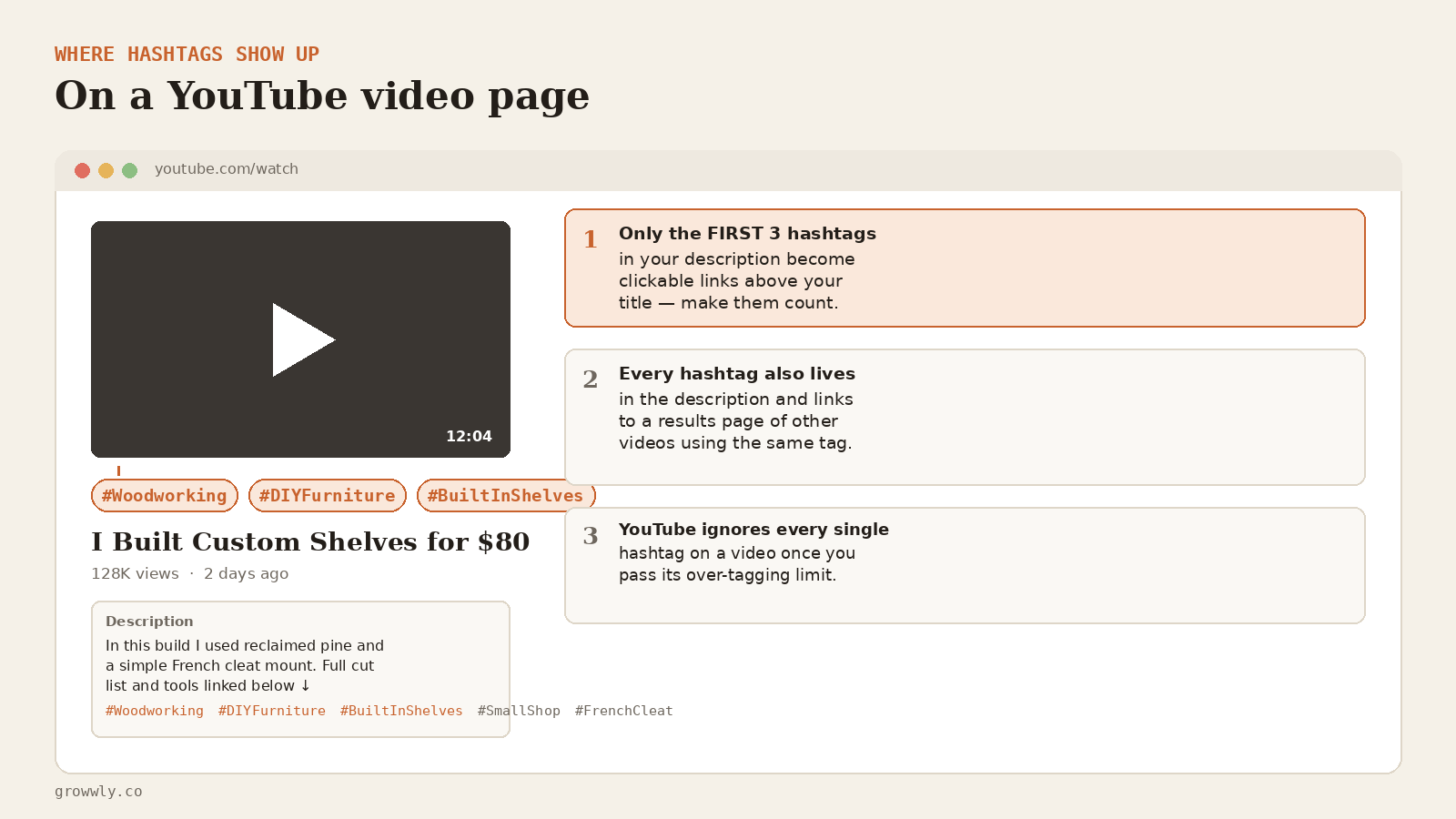 Where hashtags actually show up: up to three become clickable links above your title, the rest sit quietly in your description.
So, Are Hashtags Actually Worth Using?
Given everything above, here's the honest verdict: hashtags are worth the ninety seconds, but they're the last 5% of your optimization, not the first 50%. Packaging — your title, thumbnail, and the first fifteen seconds of retention — will always outweigh hashtags by an enormous margin. No hashtag combination rescues a weak thumbnail.
But "last 5%" isn't "worthless." Three accurate hashtags:
- Add a second discovery path. A viewer who taps
#homecookingon a rival's video can land on yours through the results page, with zero algorithm involvement. - Reinforce topic clarity for smaller channels that don't yet have a strong enough watch-history fingerprint for YouTube to categorize them confidently on its own.
- Matter more on Shorts, where the recommendation feed leans harder on explicit topic signals because it's cycling through content faster than long-form search or suggested ever does.
If you're already getting solid click-through and retention, hashtags won't move the needle much. If you're a newer channel still building that signal, they're one of the cheapest wins available to you.
Hashtags vs. Tags: Stop Mixing Them Up
This confusion trips up more creators than the hashtag rules themselves. They are two completely different fields:
| Hashtags | Tags | |
|---|---|---|
| Where you add them | Title or description, with a # |
A separate hidden field in YouTube Studio |
| Visible to viewers? | Yes — clickable | No — backend only |
| What they do | Link to a results page of similar content | Help YouTube parse commonly misspelled or ambiguous search terms |
| How many to use | 3-5 | Roughly 8-12 focused terms |
Use both. They serve different jobs, and neither one substitutes for the other.
The 3-5 Hashtag Formula That Actually Works
Skip the temptation to fill the box. A simple, repeatable structure beats a scattershot list every time:
- One category hashtag — the broad space your video lives in (
#homecooking,#personalfinance,#woodworking). - One or two niche hashtags — the specific subject of this exact video (
#airfryerrecipes,#budgettravel). - One trend hashtag, only if it's genuinely relevant — riding a real, current trend, never forced in for reach alone.
For Shorts, resist the urge to lead with #shorts. YouTube classifies a video as a Short based on its aspect ratio and length, not the hashtag, so that slot is better spent on a real topic tag. Save #shorts for last, if you use it at all.
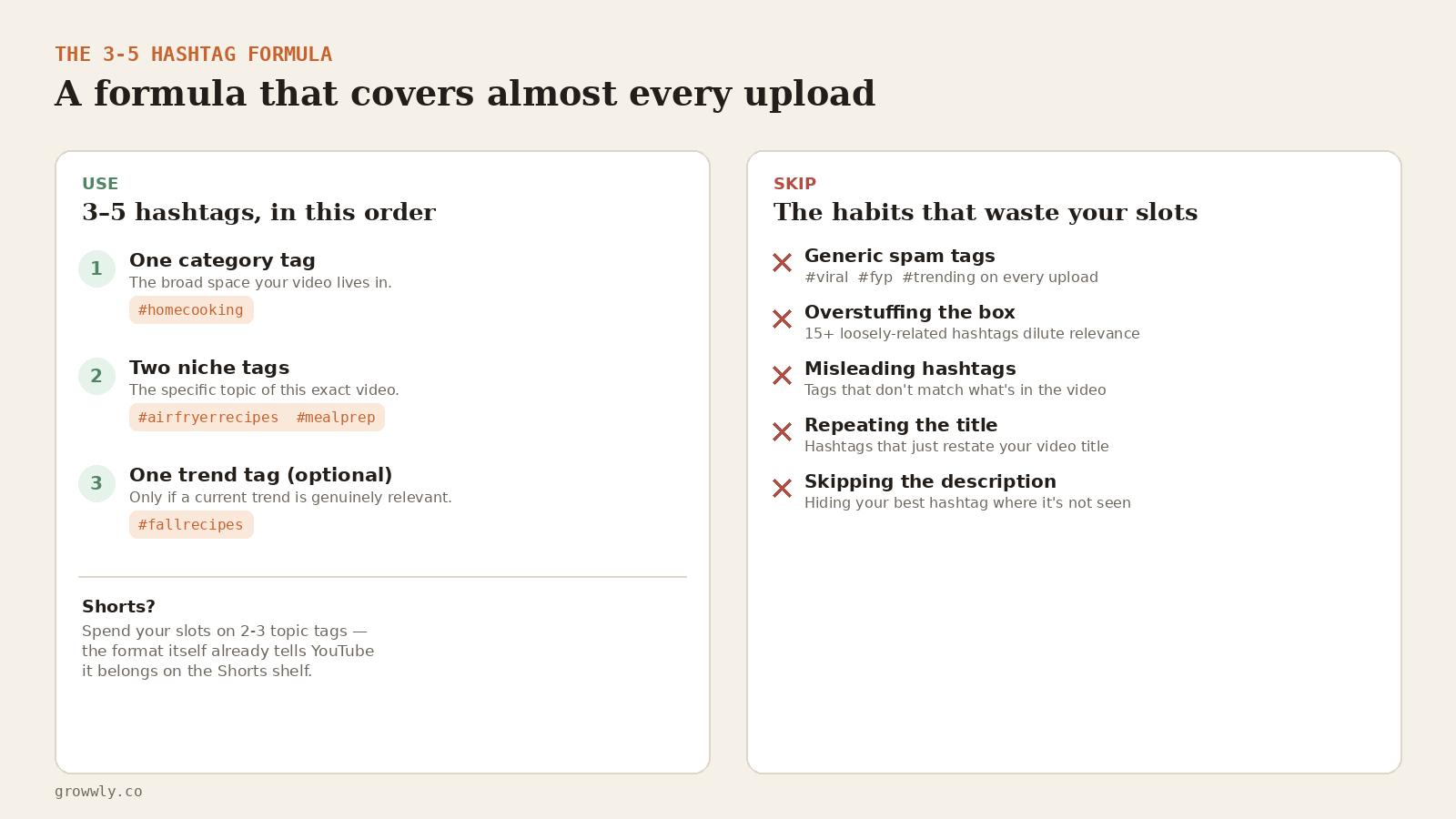 The formula that covers almost every upload — plus the five habits that quietly waste your hashtag slots.
Common Hashtag Mistakes That Quietly Hurt Your Videos
- Overstuffing the description. Ten loosely related hashtags tell YouTube less about your video than three precise ones — you're diluting the signal, not strengthening it.
- Copy-pasting generic "viral" tags.
#viral,#fyp, and#trendingon every single upload tell the algorithm nothing about your actual topic and can read as spammy to viewers. - Restating your title. If your title already says "Air Fryer Chicken Recipe," a hashtag that just repeats it word for word is a wasted slot.
- Hiding your best hashtag at the bottom. The first 100 characters of your description carry extra weight for search — that's where your single strongest hashtag or keyword phrase should live, not buried under three paragraphs of links.
- Using hashtags that don't match the content. Even without malicious intent, an inaccurate hashtag can trip YouTube's misleading metadata policy.
Where a Free Tool Saves You the Guesswork
Most of the mistakes above come down to one thing: not knowing what's actually working for the channels already winning your niche. Rather than guessing at their hashtag habits, it helps to see the whole picture — packaging, upload cadence, and Shorts mix included — before you decide hashtags are even the thing worth fixing.
That's the gap the free Channel Audit tool is built for. Drop in any public channel and it returns an instant read on upload consistency, breakout videos, Shorts mix, and overall reach — so you can see whether your discoverability problem is really about hashtags, or something further up the funnel like thumbnails and titles.
And if you want that kind of read without leaving the video page itself, the Chrome extension overlays revenue estimates, viral-potential scores, and quality signals directly on any YouTube video or channel you're viewing, and can run a full channel audit into a structured Playbook without ever opening a separate dashboard. It's a fast way to research what a competitor's actually doing right — hashtags included — while you're already on their channel.
FAQ: Are Hashtags Worth Using on YouTube?
Do YouTube hashtags help you rank higher in search? Not directly. They don't influence ranking the way your title, thumbnail CTR, and retention do. What they add is a secondary discovery path through the hashtag results page, plus a small relevance signal for newer channels.
How many hashtags should I use on YouTube? Three to five, chosen deliberately. YouTube's technical over-tagging threshold is far higher, but nothing above five improves reach — it only dilutes relevance.
Should I add #Shorts to every Short? It won't hurt, but it won't help either — YouTube already classifies Shorts by format. Spend that slot on a real topic hashtag instead.
Can too many hashtags get my video removed? Excessive or irrelevant hashtags fall under YouTube's over-tagging and misleading metadata policies, and repeated violations can lead to a video being removed from search or taken down. Staying at 3-5 relevant tags keeps you well clear of that line.
Do hashtags matter more for small channels? Generally, yes. Larger, established channels already have a strong watch-history signal that YouTube trusts. Smaller channels benefit more from every accurate, low-cost signal they can add — hashtags included.
The Bottom Line
- Hashtags are a discovery signal, not a ranking hack.
- YouTube shows your top 3 hashtags as clickable links above your title — make them your best three.
- Stick to 3-5 relevant hashtags: one category, one or two niche, one optional trend.
- Skip generic spam tags, overstuffing, and hashtags that just restate your title.
- They matter more for smaller or newer channels than for established ones with strong watch-history data.
- Hashtags are worth the ninety seconds — just don't mistake them for a growth strategy on their own.
If you're trying to figure out what's actually holding your channel back — hashtags or something bigger — run a free Channel Audit or add the Chrome extension and see the full picture right on YouTube itself.

The Psychology Behind Videos That Get Millions of Views
Explore the psychology of viral videos, from curiosity and emotion to clarity and payoff, with evidence-led ideas for YouTube Shorts and long-form content.
Read the post
Why Going Viral Can Kill Your Channel and How to Avoid It
Can going viral hurt your YouTube channel? Explore the risks of chasing a hit, losing focus, overspending and how to protect your creative direction.
Read the post